Block bindings
Custom fields store structured data - event dates, subtitles, cover images, prices - but that data does not appear on the front end by itself. You still need a way to display it.
Block bindings do that in Gutenberg. Like dynamic data in page builders, they connect a Meta Box field to a core block - a Paragraph shows your subtitle, an Image block shows your cover photo. Meta Box registers your fields as block binding sources by default, so you can use them in Gutenberg without PHP templates or a custom block.
Why use block bindings?
Block bindings bring Meta Box field data into Gutenberg - connect fields from posts, terms, authors, or settings pages to Paragraph, Heading, Image, Button, and other core blocks, right in the editor.
- Like dynamic data, but for Gutenberg - pick a field, and the block shows its value on the front end.
- No extra code - bind a Paragraph or Image block directly to a field.
- Single source of truth - update the field once. Every bound block reflects the change.
- Native block styling - use core blocks with full typography, spacing, and layout controls.
They work in post content, block templates, and synced patterns - alongside other ways to display fields when you need them.
This feature requires WordPress 6.5+. The Attributes panel in the block editor (to pick a field visually) requires WordPress 6.9+.
Binding sources
Meta Box registers a separate source for each object type:
| Source | Label | Available with |
|---|---|---|
meta-box/post-field | Meta Box Post Field | Meta Box (posts and custom post types) |
meta-box/term-field | Meta Box Term Field | MB Term Meta |
meta-box/author-field | Meta Box Author Field | MB User Meta |
meta-box/setting-field | Meta Box Setting Field | MB Settings Page |
In the block editor, pick the source that matches where your field is stored, then choose the field (or a field property for structured fields).
Hiding a field from block bindings
By default, Meta Box makes fields available for block bindings. If you do not want a field to appear in the block editor bindings UI, you can hide it.
Using MB Builder
- Edit a field.
- Open the Advanced tab in field settings panel.
- Turn on Hide from block bindings?.
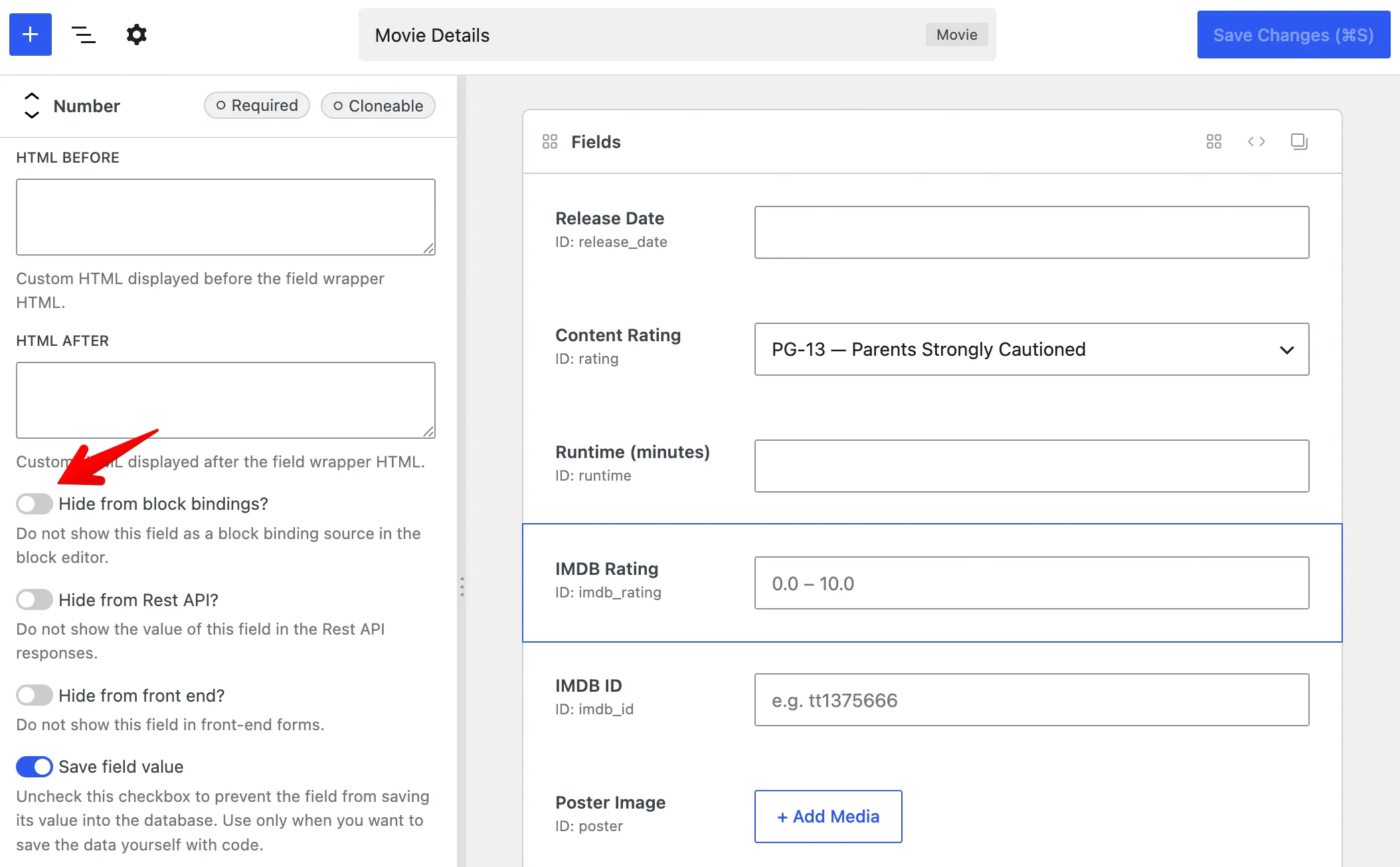
The instruction above uses MB Builder, an extension providing the UI to create fields, and is already bundled in Meta Box Lite and Meta Box AIO. If you prefer to use code, please see below.
Using code
Add 'hide_from_block_bindings' => true to the field settings:
add_filter( 'rwmb_meta_boxes', function ( $meta_boxes ) {
	$meta_boxes[] = [
		'title'      => 'Movie Details',
		'post_types' => 'movie',
		'fields'     => [
			[
				'name'                     => 'IMDB Rating',
				'id'                       => 'imdb_rating',
				'type'                     => 'number',
				'min'                      => 0,
				'max'                      => 10,
				'step'                     => 0.1,
				'hide_from_block_bindings' => true,
			],
		],
	];

	return $meta_boxes;
} );
Binding a block to a field
- Edit a post, template, or pattern in the block editor.
- Select a block that supports bindings (for example Paragraph, Heading, Button, or Image).
- In the block settings sidebar, open the Attributes panel.
- Choose the attribute to bind (for example Content for a paragraph, or URL for an image).
- Select the Meta Box source for your field type (for example Meta Box Post Field), then pick your field (or a field property for structured fields).
The bound attribute uses the field value when the content is rendered on the front end.
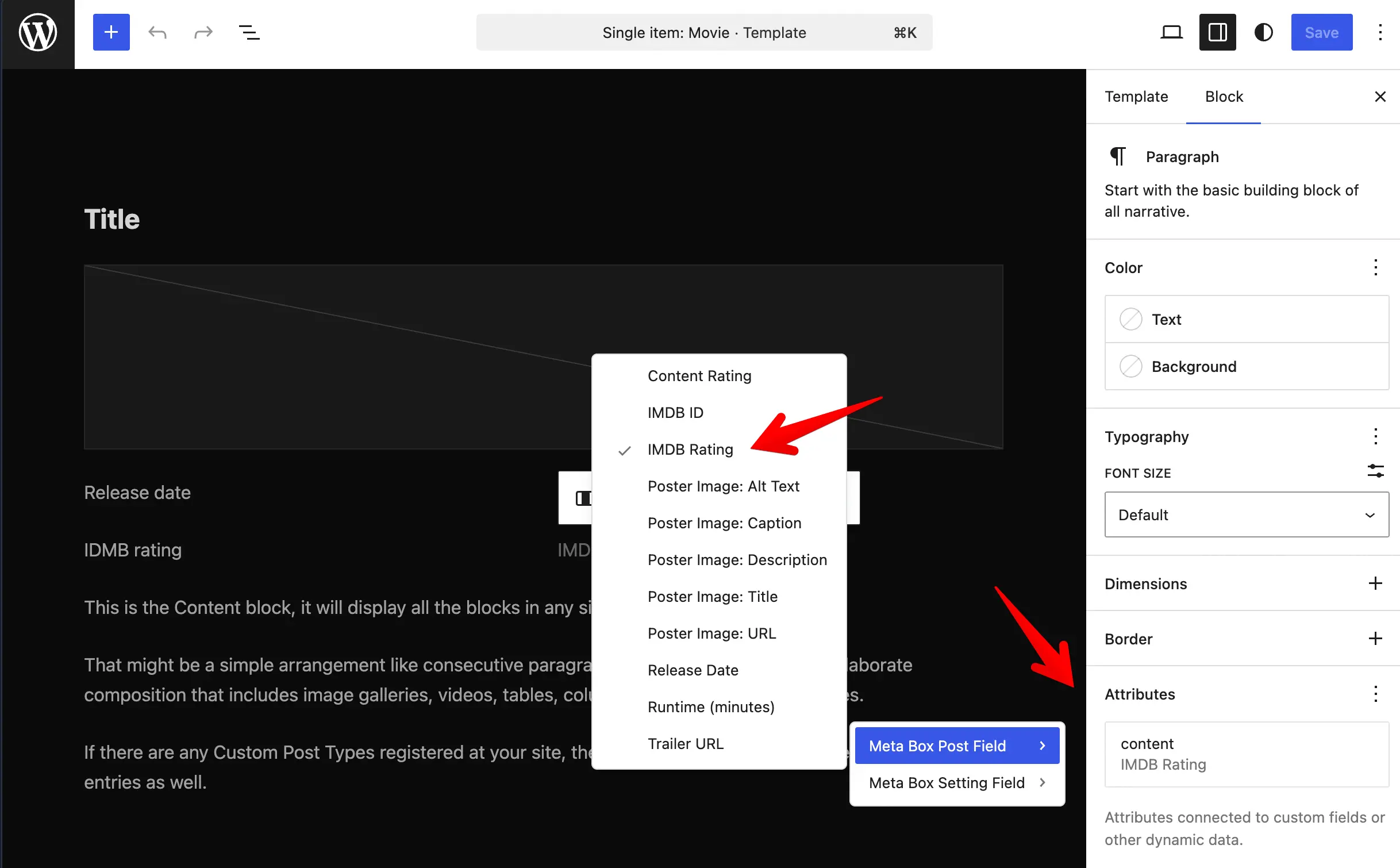
The Attributes panel is available from WordPress 6.9 onward. On WordPress 6.5 to 6.8, you can still bind attributes in the Code editor. Example for a paragraph bound to an imdb_rating post field:
<!-- wp:paragraph {
  "metadata":{
    "bindings":{
      "content":{
        "source":"meta-box/post-field",
        "args":{"id":"imdb_rating"}
      }
    }
  }
} -->
<p>Fallback text</p>
<!-- /wp:paragraph -->
Use meta-box/term-field, meta-box/author-field, or meta-box/setting-field for fields on terms, authors, or settings pages.
Structured fields
Scalar fields (text, number, email, and similar) expose a single binding option: the field value as a string.
Structured fields expose properties you can bind separately. In the UI they appear as labels like Poster Image: URL or Poster Image: Alt Text. In code, pass a key in the binding args:
<!-- wp:image {
  "metadata":{
    "bindings":{
      "url":{
        "source":"meta-box/post-field",
        "args":{"id":"poster","key":"url"}
      },
      "alt":{
        "source":"meta-box/post-field",
        "args":{"id":"poster","key":"alt"}
      }
    }
  }
} -->
<figure class="wp-block-image"><img alt=""/></figure>
<!-- /wp:image -->
Supported properties by field type:
| Field type | Properties (key) |
|---|---|
single_image, image, image_advanced, image_upload | url, alt, title, caption, description |
file, file_advanced, file_upload | url, title |
background | image |
link | url, title, target |
map, osm | latitude, longitude |
post | post_title, post_excerpt, post_content, post_date, post_modified, post_author, url |
taxonomy, taxonomy_advanced | name, slug, description, url |
user | display_name, user_url |
video | src, title, caption, description |
fieldset_text | Each option key from the field's options |
If key is omitted, Meta Box falls back to the bound block attribute name (for example, an Image block's url attribute).
Limitations
- Groups are not supported. Block bindings map one block attribute to one value (a string, URL, and similar). A group stores nested fields as a structured set of values, so it cannot bind cleanly to a single Paragraph, Heading, or Image attribute. For group-based layouts, use MB Views or MB Blocks instead.
- One value only. If a field is cloneable or stores multiple values (for example a multi-select or checkbox list), the binding uses only the first value.
- Editor preview. Bound attributes are resolved on the front end. The editor lists available fields for binding but does not show live field values in the canvas, and bound values are not editable from the block.
- Access. Bound values are only returned when the visitor can view the related object. For posts, that means password-protected or private content stays hidden from unauthorized visitors. For non-public taxonomies, term fields follow the same idea.